Architecture
PlainShelf is one Go binary with an embedded Vue frontend. The same frontend is served three ways — over HTTP to a browser, inside a Wails desktop window, and inside a Capacitor WebView on Android — and every one of them is a client of the same API surface.
System shape
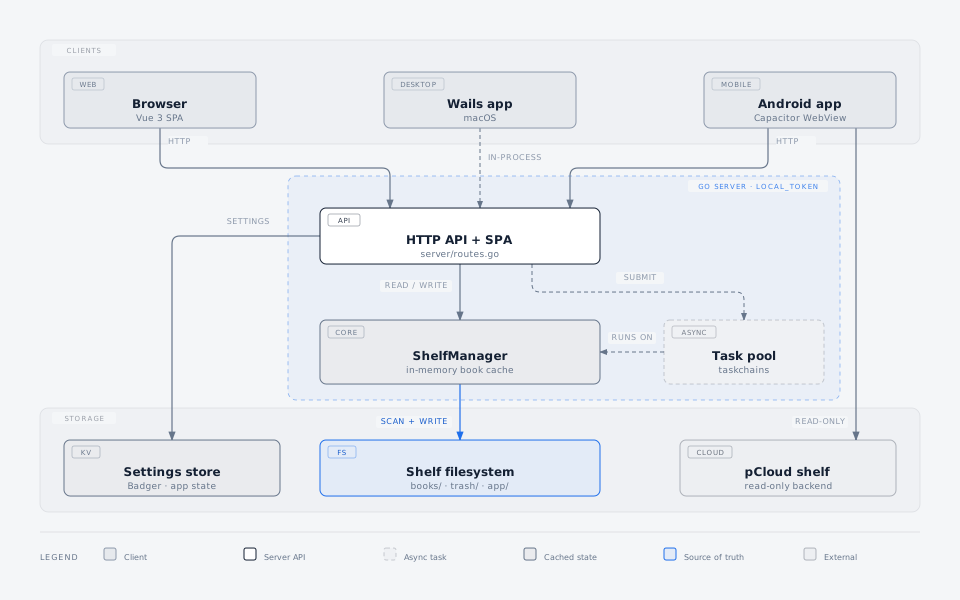
Three things in that picture are load-bearing.
The shelf filesystem is the source of truth. ShelfManager holds an
in-memory book cache, but the cache is only an accelerator — it is rebuilt from
books/ and never becomes the authority. See
Data Model for the on-disk layout and
Shelf Cache and Disk I/O for how the cache stays fresh.
The desktop client does not speak HTTP. Wails serves the embedded frontend
and routes any request whose path starts with /api/ straight into the server's
handler in the same process. There is no listening socket, which is why the
desktop app needs no port and no token.
The Android client has two independent paths. It can talk to a PlainShelf server over HTTP like any other client, or it can read a shelf held on pCloud directly, bypassing the server entirely. The second path is a read-only storage backend, not synchronisation: nothing is ever written back to pCloud.
The security boundary
Mutating requests cross the local_token boundary. The token is generated at
startup and carried in the X-PlainShelf-Token header; origin checking is
applied alongside it. protect_read extends the same requirement to reads. The
password and external modes are reserved names and are not implemented.
A shelf rescan (POST /api/shelves/{id}/scans) is the one POST the token
treats as a read: it walks the shelf and rebuilds the cache without writing, so
protect_read governs it, and read-only mode accepts it for the same reason.
The origin check still applies, so it is exempt from the token but not from
CSRF.
The log API (/api/logs) is the one read that always needs the token, whatever
protect_read says. Logs are server internals rather than shelf content: they
record every request path, so reading them yields the shelf's structure along
with access times and remote addresses. Turning protect_read off to let the
household read books over the LAN is not a decision to publish that. The origin
check rides along with the token as it does for a write, so a browser reading
the logs must also come from an allowed origin. Security mode none still opens
everything, because it is an explicit choice not to authenticate.
Reading state is not part of the shelf
Reading progress, read history and reading statistics are device-local. They
are not stored in the shelf, so they are not carried by a backup of books/,
and two devices pointed at the same shelf keep their own.
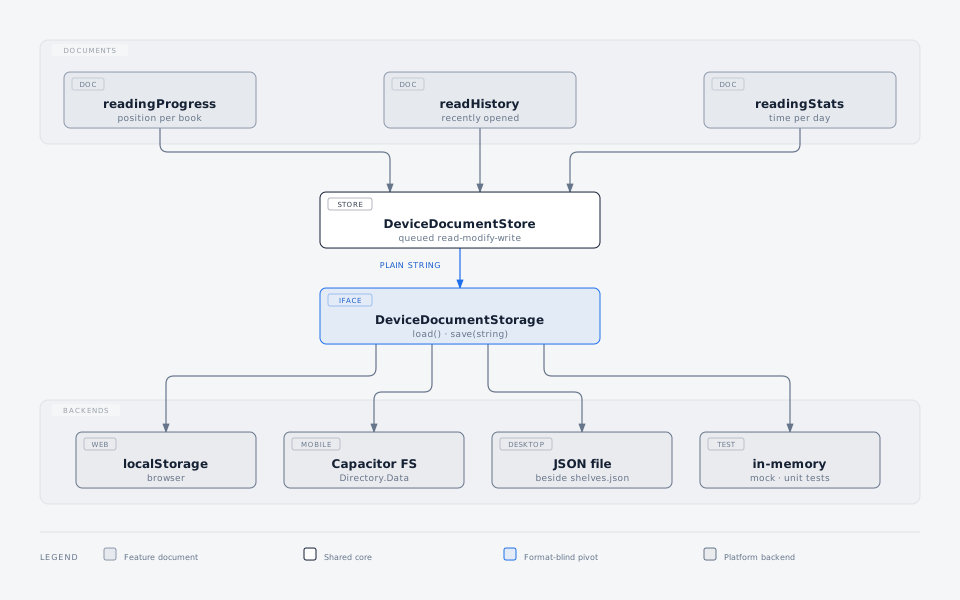
The pivot is deliberately narrow. DeviceDocumentStorage only knows how to load
and save one string; parsing, merging and trimming live in each feature's own
document module, so every platform shares one implementation and a new backend
only has to persist text.
Which backend a document actually gets
The backend is resolved per document, not per platform, so the table is not uniform:
| Document | Browser | Android shell | Wails desktop | Standalone reader |
|---|---|---|---|---|
readingProgress |
localStorage | localStorage | JSON file | JSON file (shared with desktop) |
readHistory |
localStorage | Capacitor Filesystem | JSON file | localStorage |
readingStats |
localStorage | Capacitor Filesystem | JSON file | localStorage |
Mock API mode and unit tests use the in-memory backend for all three.
The standalone reader binds only the reading-progress methods, so its read
history and reading stats fall back to WebView localStorage; its reading
progress goes to the same JSON file the desktop app uses, which is what lets it
reach the desktop library (below). The reader's read history still lives in its
own localStorage, but when the desktop shells out to it the launching side
(WailsBookshelfProvider.openDesktopReader) writes the entry into the desktop's
own readHistory after the launch succeeds, so the desktop app's "recent
reading" sees a book read this way.
readingProgress has no Android-specific path today: it stays on the WebView's
localStorage there, while read history and reading stats do not. That matters,
because the Capacitor backend was chosen precisely to escape WebView storage —
Directory.Data is app-private internal storage, needs no runtime permission,
and, unlike localStorage or IndexedDB in an Android WebView, is not subject to
silent storage eviction.
The Capacitor backend lives in frontend/src/shells/mobile/, not in
frontend/src/storage/, and the seam is deliberate: it is what stops
@capacitor/filesystem from being pulled into the web and desktop bundles by
the read-history and reading-stats stores.
Reader progress reaches the desktop library
The standalone reader is a separate process with its own window. How it keys a book's progress depends on how it was launched:
- Launched from the desktop app (macOS), reading a book shells out to the
installed
PlainShelfReaderwith the book's.bookpkgpath (-book) and its real shelf id (-shelf <realShelfID>). The reader reports that real shelf as its active shelf, so it opens at — and writes back to — the sameshelves.<realShelfID>.<bookID>position the desktop library already holds, whichever source last recorded it (the reader, the in-app reader, or an import). Both sides read and write the same key, so no projection is involved. A chapter "read" action adds-section <index>(the reader's own section index, matching the?section=deep link), so the reader opens on that chapter instead of the restored progress; a default read omits it. - Run standalone (opened directly, no
-shelf), the reader has no real shelf, so it keys every book's progress under one synthetic shelf id,book, which the desktop app projects onto the real shelves later (below).
Either way the reader writes into the same reading_progress.json the desktop
app keeps, rather than its own WebView storage — that is what lets its progress
reach the desktop library.
Only the desktop shells out to the standalone reader — web and mobile keep the in-app reader, which is the same shared code and stays the desktop's fallback if the reader will not launch. A chapter jump shells out the same way, passing its section so the standalone window opens on that chapter; the in-app reader at that section remains the fallback when the reader will not launch.
One file has more than one writer, so every entry carries the wall-clock time it was written and all reconciliation is newest-wins per book:
- When the desktop and a desktop-launched reader both write the same real shelf, the more recent write wins for each book. Neither process owns the namespace, so neither can clobber the other by holding a stale in-memory copy — the loser is simply the older timestamp. A reset is a timestamped tombstone (offset 0) rather than a deletion, so it too competes by recency instead of being resurrected by an older advance.
- A standalone reader still has no real shelf, so it keys progress under
book, and the desktop app projects those entries onto the real shelves that hold them — matched by stable book ID (which survives moves and renames and identifies exactly one book), taking the newer entry. The projection runs whenever the desktop reads progress, so a book read in the reader shows its new position the next time the library or that book is opened. - An entry the desktop cannot place — a book that has been removed, or a loose
book opened in the reader from outside every shelf — is left under
bookuntouched, never guessed onto the wrong shelf, and folded in later if that book is imported. - Writers coordinate through a lock on the file, and each read-modify-write re-reads under it, so a write only ever replaces entries older than itself.
A book opened through the desktop app is therefore fully two-way: the reader
starts at the desktop library's stored position and writes back to the same
real-shelf key, and a later position from either side — forward or a reset — wins
by recency. Only a reader opened directly stays one-way, its book namespace
folded in by projection; progress recorded in the desktop app does not appear
there because it never carried that book's real shelf id. Nothing here is written
into the shelf; reading progress stays device-local convenience state.
The diagram cannot show either of these:
- Mutations are queued. Every change is a read-modify-write chained behind the previous one. Without that, opening the reader while a reading-time tick fires would let one write silently overwrite the other. A failed mutation does not wedge the chain.
- The storage key is scoped to the server, not just the shelf. A client that
can be repointed at another server (the Android shell) keys its document on
{apiBase}|{shelfID}, because two servers commonly both call a shelfdefault_shelfwhile their book IDs mean entirely different things. Same-origin clients (web, desktop) keep the bare shelf ID.
Where the code lives
| Path | Responsibility |
|---|---|
shelf/ |
Filesystem-backed library core: books, folders, trash, locking, cache |
server/ |
HTTP API, routing, security, settings store, worker pool |
frontend/ |
Vue UI, device-local storage, Capacitor Android project |
desktop/ |
Wails desktop client |
internal/epub/ |
EPUB parsing and rendering, used only at import time |