Shelf Cache and Disk I/O
PlainShelf is filesystem-first: the shelf directory on disk is the source of truth, and the server keeps an in-memory cache so common browsing operations do not need to reopen every metadata file on every request.
This page explains what PlainShelf reads during shelf startup and browsing, why large shelves or network-mounted shelves can feel slower, and how to tune the cache intervals.
Initial cache initialization
When a shelf is opened, PlainShelf initializes the book cache in the background. The initial cache build performs a full scan of the shelf's books/ tree.
During that first scan, PlainShelf:
- walks directories under
books/; - records every folder it passes, including empty ones;
- detects book package folders ending in
.bookpkg; - opens each book's
book.jsonmetadata file; - decodes the metadata into memory;
- records the metadata file's modified time and size for later cache validation;
- opens the book's current source
meta.jsonto record its character count.
So yes: the first successful cache initialization reads every book metadata file once. It does not scan the whole operating system disk; it scans the configured shelf root, specifically the shelf book tree.
What gets read per book
For each discovered book package, the important disk operations are roughly:
- a stat of the book package folder when it is opened (the tree walk itself takes entry types from the directory listing and only stats an entry that is a symlink);
- an open/read/decode of
{book}.bookpkg/book.json; - a stat of
book.jsonto remember itsmtimeand size; - an open/read/decode of the current source's
sources/{source}/meta.json, which is where a book's character count is stored.
The amount of data read is usually small because book.json is a metadata file. The cost is mostly from many small filesystem operations, not from raw throughput.
For example, a shelf with 10,000 books may only read a modest amount of metadata bytes, but it still needs thousands of directory, open, and stat operations. That is usually fine on a local SSD, but it can be noticeable on HDDs, SMB/NAS mounts, or other high-latency filesystems.
Subsequent book listing behavior
After the initial cache is ready, book list operations normally return from the in-memory cache.
PlainShelf still needs to keep the cache reasonably fresh. It does this with two levels of refresh:
- Full scan
- Walks the
books/tree again. - Discovers new, moved, or removed book packages and folders.
- Reopens book metadata for discovered books.
-
Controlled mainly by
scan_interval. -
Per-book freshness check
- Checks known cached books without walking the whole tree.
- Stats each cached book's
book.jsonand compares the currentmtimeand size with the cached values. - Reopens a book only when its tracked metadata file stat changed.
- Controlled mainly by
book_check_interval.
Within the configured intervals, repeated browsing can be served from memory with little or no filesystem I/O. That includes the character counts the home page shows: they are cached beside each book, so asking for them adds no disk operation to a listing.
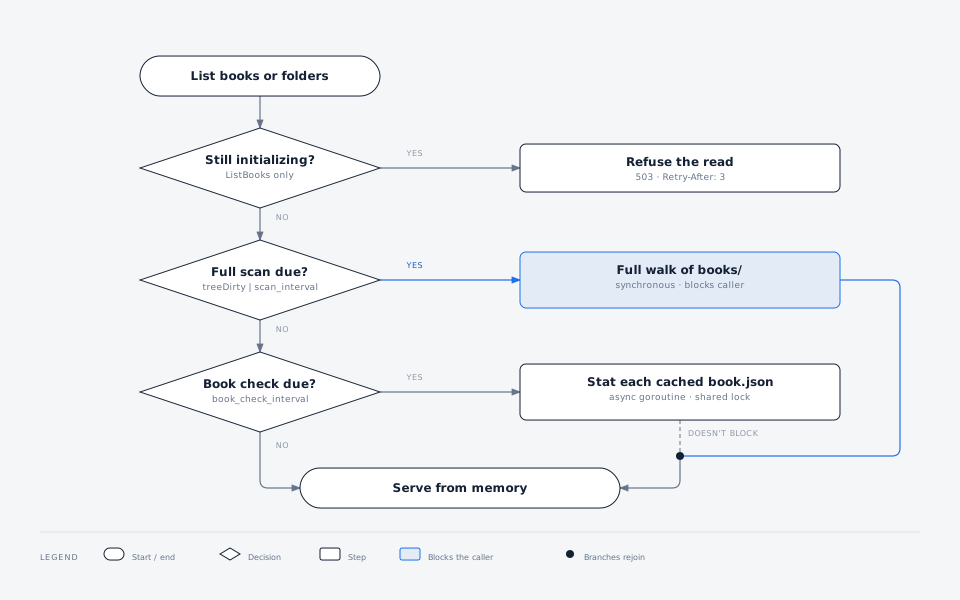
The two tiers differ in more than frequency. A full scan is synchronous, so mutations are visible to the caller that triggered it — and a slow shelf makes that caller wait. The per-book check runs in a background goroutine under the same shared lock every read takes, so it never blocks the listing that scheduled it.
The first gate is a book-listing gate
Only book listings are refused while the initial cache is still being built.
A folder listing takes the shared lock without that check, so a request that
arrives during initial construction performs its own full scan and answers
200 — slowly — rather than 503. Everything after that first gate is
identical for both.
Character counts
A book's character count is not stored in book.json but in its current source's meta.json, so the per-book freshness check above — which compares book.json — cannot see a count change on its own.
PlainShelf closes that gap at the point of writing: every request that rewrites a source's content, recomputes its statistics, or moves the current-source pointer refreshes that book's cached count before it answers. A count is therefore correct immediately after any change made through PlainShelf.
A source edited outside PlainShelf is the exception, and behaves like every other external change: the new count appears after the next full scan, or immediately after Update book list.
Folder listing
The folder tree comes from the same cache, filled by the same walk, so listing folders is not a separate traversal of books/ and is throttled by scan_interval like any book listing.
Folders created, renamed, moved, or deleted through PlainShelf update the cache as they happen, so they appear in the very next listing regardless of the interval. Only a folder created or removed outside PlainShelf waits for the next full scan.
Skipping folders that did not change
A full scan does not have to list every folder to find out that nothing moved.
A directory's modification time changes whenever one of its direct children is added, removed, or renamed. So each scan writes down the modification time of every directory under books/ together with the entries it found there, and the next scan replaces the directory listing with a single stat wherever that time is unchanged. On a shelf where most folders sit untouched between scans — the normal case — the cost of a full scan drops from one listing per directory to one stat per directory, plus a listing for the few that actually changed.
This is polling made cheaper, not polling removed, so it helps on an SMB, NAS, or cloud mount for the same reason it helps on a local disk: on those mounts a directory listing is several round trips and a stat is one.
Three things it deliberately does not do:
- It does not decide whether a book changed. A directory's modification time says nothing about what happened inside its subdirectories, so everything inside a
.bookpkgfolder —book.jsonabove all — is still checked by the per-book stat described above. Editing a book is never hidden by this. - It does not trust a folder inside one that changed. A modification time identifies a folder's content, not the folder itself: move one away and rename another into its place and the path holds something else, possibly carrying the same time. What rules that out is the folder above — renaming a folder into place changes its parent's time — so a folder is only believed when its parent's listing is proven unchanged too. When a folder does change, everything below it is listed again on that one scan, and cheap again on the next.
- It does not trust a folder that was just touched. Timestamps are coarse: ext3 and HFS+ store whole seconds, a FAT-backed share reached over SMB stores two. A folder modified again inside the same tick would keep the recorded time and then look unchanged forever, so a folder modified within the last two seconds is left out of the record entirely and listed normally next time.
- It does not survive being wrong. The record lives in
app/scan-cache.json, is checked against the real modification times on every use, and is discarded whole if it is missing, unreadable, or written by a newer build. The worst case is a scan that costs what it cost before.
The file is written after the first scan of a process and again at shutdown, not after every scan — a shelf whose folders are not changing produces the same record every time, and an identical record is not rewritten. Pressing Update book list still writes nothing.
Rescanning on demand
Everything above is on a timer. Nothing tells PlainShelf that you just copied a book into books/ from outside it, so within scan_interval the book is not there yet — and on an SMB, NAS, or cloud-mounted shelf there is no change notification that could tell it sooner.
Update book list on the library toolbar is the answer. It walks the shelf immediately and reports what it found, and it is the same action in every setup: local disk, SMB, rclone or another cloud mount, and the Android client's pCloud shelf alike. If something you changed outside PlainShelf has not appeared, this is the thing to press.
Its endpoint is POST /api/shelves/{shelf_id}/scans.
scan_intervaldoes not apply to it. The interval exists to stop repeated browsing from re-walking the tree; pressing the button has already answered the question it asks.- It writes nothing. The walk rebuilds the in-memory cache and touches no file in the shelf, so it works on a read-only server. That is what separates it from the manual export below, which forces the same walk but then writes a file.
- The shelf stays readable while it runs. The walk holds the same shared lock every read takes, so browsing is not blocked, and a large or slow shelf does not go unavailable for the duration.
- One walk at a time. If a rescan is already running on that shelf, a second request is refused with
409naming the one in progress, rather than starting a duplicate walk. It is refused rather than attached to it because a walk that began before your change cannot report your change — waiting for it and asking again is what actually answers the question. - It reports the counts it found, so the button can say how many books and folders are on the shelf now.
Tuning options
scan_interval
scan_interval controls how often PlainShelf performs a full on-disk scan of the shelf book tree.
A shorter interval discovers externally added, moved, or deleted books and folders sooner, but performs more directory traversal and metadata reads. A longer interval reduces filesystem and network I/O, but external changes may appear later — and when they do, the rescan above is what you press instead of shortening the interval for the one time a year you need it.
Example:
app_conf:
  shelves:
    - id: default_shelf
      name: Default Shelf
      lib_root: /path/to/shelf
      scan_interval: 10m
book_check_interval
book_check_interval controls how often PlainShelf checks cached books for metadata changes.
A shorter interval notices external edits to existing book.json files sooner. A longer interval reduces repeated per-book stat operations, which can matter on high-latency filesystems.
Example:
app_conf:
  shelves:
    - id: default_shelf
      name: Default Shelf
      lib_root: /path/to/shelf
      scan_interval: 10m
      book_check_interval: 5m
If book_check_interval is omitted, it defaults to the same duration as scan_interval.
scan_cache
scan_cache controls the folder-skipping behavior described above. It is on by default; set it to off to make every scan list every directory again.
Turn it off only for a mount whose directory modification times cannot be trusted. Some cloud storage gateways do not update a directory's time when a child is added, and on such a mount a book copied in from outside would never be discovered. If new books appear only after you restart the server or delete app/scan-cache.json, this is the setting to try.
book_cache_interval
book_cache_interval bounds how quickly a change reaches the exported book cache described below. It defaults to one hour, and only applies to shelves that export one.
It is not how often the file is rewritten: an export whose content matches what was written last does not touch the disk, so a shelf nobody changes is never rewritten no matter how short the interval is.
app_conf:
  shelves:
    - id: default_shelf
      name: Default Shelf
      lib_root: /path/to/shelf
      book_cache_interval: 30m
Storage impact by filesystem type
Local SSD
The disk-wear impact of these reads is usually negligible. SSD lifetime is primarily affected by write volume, while shelf cache initialization mostly reads small metadata files.
Local HDD
The main cost is seek latency from many small directory and metadata operations. This can make the first scan slower on very large shelves, but normal interval-based scanning should not be a major wear concern.
SMB/NAS or other network mounts
Network filesystems are the most sensitive case. The expensive part is often the number of round trips for stat, directory, and small-file reads rather than the number of bytes transferred.
For SMB/NAS shelves, prefer longer intervals such as:
app_conf:
  shelves:
    - id: default_shelf
      name: Default Shelf
      lib_root: /mnt/plainshelf/default-shelf
      scan_interval: 10m
      book_check_interval: 5m
      lock_timeout: 30s
If browsing is still slow, increase book_check_interval first. If external additions or moves do not need to appear immediately, increase scan_interval too.
The exported book cache
Everything above is in-memory state, rebuilt from the shelf whenever PlainShelf starts. It does nothing for a client that reads the shelf directly instead of through the server.
The Android app opening a shelf from pCloud is that client. It has no server to ask, so it walks the shelf itself, and each book costs two HTTP requests — one to get a download link for book.json, one to fetch it. On a shelf of any size that is slow, and it can hit pCloud's request limit.
So the server and the desktop app write the listing down. Each one exports app/book-cache-{writer-id}.json, containing every book's book.json, each book's package path, and the shelf's folders. A client downloads that one file instead of walking the shelf, and the cost of opening a library stops growing with the number of books in it.
When it is written
- after the initial scan, so a client that arrives before anything else has read the shelf still finds a file;
- once
book_cache_interval(default one hour) has elapsed since the last export, the next time the shelf is read or written; - when the shelf is closed;
- on demand, from Settings → Shelves → Mobile book cache, or
POST /api/shelves/{shelf_id}/book-cache-exports.
That manual export also forces a rescan, but it is not the way to ask for one: it exists to publish the file a phone reads, and it writes to the shelf. To make a book appear in the library, use the rescan above.
Each of those is a moment the export is considered, not a write. Whether anything reaches the disk is decided by comparing the content against what was written last: an unchanged shelf is left alone, because an identical rewrite is a pointless upload on exactly the cloud and network shelves this feature exists for. That comparison is also why there is no "something changed" flag anywhere — book metadata is edited in place, and a flag would have to be set by every edit path, with the one that got missed silently ending the exports.
There is no background timer either. An export only has something new to say after the shelf has been read or written, and every such path already passes through the check.
What timestamp means
The manual trigger always rescans the shelf first, because timestamp records when the walk behind the file began — not when the file was written, and not when the walk finished.
A client uses it to decide which books it can take from the cache: a book.json whose modification time is at or after that second is read directly instead. All three choices are the conservative one:
- a write time would claim freshness the walk never verified;
- the walk's end time would cover a book edited while the walk was still running, after it had already been read;
- and because both sides carry whole seconds, an edit inside the same second as the walk cannot be ordered against it, so equality means "read it".
Each of those costs a couple of requests for one book. The alternative is showing a title or current source that is quietly wrong.
Several machines, one shelf
The writer ID is generated on first start and stored outside the shelf, with the server's other settings. It identifies the installation, not the shelf, so a machine that opens three shelves writes the same ID into all three, and two machines sharing one shelf keep separate files. A client picks the most recently written one.
An installation removes another's file only after 30 days without an update — long enough that a machine switched off for a holiday keeps its entry. Files it cannot parse are never removed, so anything else under app/ is left alone.
Notes
- The file is disposable. Delete it and it comes back; a client that finds none, or one it cannot read, falls back to scanning the shelf.
- Its
schema_versionis a cross-device contract: the phone reader rejects a file whose version it does not match exactly and walks the shelf book by book instead — safe, but a per-book request cliff over pCloud, not free. Data Format Versioning covers what a mismatch costs and why the version is duplicated on the TypeScript side. - It contains exactly what
book.jsonalready contains. If your shelf is private, it is no more revealing than the shelf itself — but it does put every book's metadata in one file, which matters if you shareapp/more widely thanbooks/. book_cache_writer_idcan be pinned per shelf in the config file if you want a predictable name; leave it unset and PlainShelf supplies one.
Write safety
Everything above describes reads. Writes follow two rules so that an abrupt shutdown cannot leave the shelf in a broken state.
Every file is written atomically. Content goes to a temp file beside its destination and is then renamed over it. A reader — PlainShelf, your backup tool, or your file manager — never sees a partially written book.json, meta.json, source.txt, cover.*, or trash.json. If the process dies mid-write, the destination still holds its previous complete content.
Temp files are named <destination>.<random>.tmp. The .tmp suffix is deliberate: file sync clients such as Dropbox, Syncthing, and iCloud are commonly configured to ignore it, so an in-progress write is not synced before it is complete. The random segment keeps two concurrent writers from sharing a temp file.
Creating and importing a book is transactional. A new book is assembled in full — its metadata, its first source, and the current-source pointer — inside app/tmp/, and only then renamed into books/ in a single step. A book therefore either appears in your library complete or does not appear at all; an interrupted import cannot leave a book with no source behind.
app/tmp/ holds only in-progress data and is wiped when a shelf is opened, so leftovers from an interrupted run are cleaned up automatically at startup.
A crash can still leave a stray *.tmp file next to its destination. These are inert — PlainShelf ignores them when scanning — and safe to delete by hand.
What this does not cover: two clients editing the same book at the same time. Each write lands complete, but the later one replaces the earlier one. See known issues.
Opening a shelf read-only
Opening a shelf normally writes to it before anything is read: the folder layout is created if missing, app/tmp/ is wiped, a legacy .trash/ is migrated, and the lock file, the scan cache, and the exported book cache are all written under app/.
read_only turns every one of those off, so the shelf is taken exactly as it is found:
app_conf:
  shelves:
    - id: archive_shelf
      name: Archive (read-only)
      lib_root: /mnt/backup/plainshelf-shelf
      read_only: true
Use it for a shelf this PlainShelf instance cannot or must not write to — a read-only mount or snapshot, a restored backup image, a share exported read-only.
What changes:
| Normal shelf | read_only: true |
|
|---|---|---|
Missing lib_root |
Created | Startup fails |
books/, trash/books/, app/tmp/ |
Created if missing | Not created; a shelf without them still lists |
Legacy .trash/ migration |
Runs at startup | Skipped |
app/library.lock |
Written (lock_mode: flock) |
Never written; lock_mode is forced to none |
app/scan-cache.json |
Written at startup and shutdown | Never written; an existing one is still read |
app/book-cache-*.json |
Written when book_cache_writer_id is set |
Never written; the ID is ignored |
app/fingerprint-cache.json |
Written by the source fingerprint task | Never written; the task is refused with 409, an existing one is still read |
| Creating, editing, moving, deleting | Allowed | Refused with HTTP 409 before anything is touched |
Two consequences worth knowing:
- Every start pays for a full walk. The scan cache is read but never written, so a read-only shelf cannot get cheaper across restarts the way a writable one does. On a large or high-latency shelf, that is the cost of the guarantee.
- The whole shelf is read-only, not just its files. The write endpoints stay routed and answer 409; nothing in the UI is hidden yet.
read_only is per shelf, so one server can serve a writable shelf and an archived one side by side.
app_conf.read_only puts the whole server in that mode instead: every write request is refused, and every shelf — including one added after startup — is opened exactly as if it carried read_only: true, so nothing in the table above is written for any of them. Rescanning stays allowed, because a rescan only walks the shelf and rebuilds the in-memory cache.
Practical guidance
- For small or medium local shelves, the defaults are usually fine.
- For large local shelves, consider increasing
scan_intervalif startup or browsing causes noticeable disk activity. - For SMB/NAS shelves, start with
scan_interval: 10mandbook_check_interval: 5m, then tune upward if browsing is still slow. - If you edit shelf files outside PlainShelf, remember that longer intervals trade immediate visibility for lower I/O — and that Update book list overrides the trade whenever you need it to.